1. Introduction: The Death of the “Just a Prototype” Era
For too long, the promise of AI-assisted coding has been hampered by a frustrating “last mile” problem. We’ve all been there: an AI generates a brilliant snippet of code, but you then spend hours manually provisioning databases, configuring authentication, and wrestling with environment variables just to see it run. Google AI Studio has officially signaled the end of this era. With its latest suite of updates, the platform has pivoted from a simple code generator to a comprehensive, production-ready application builder that handles the heavy lifting of infrastructure automatically. The wall between idea and deployment has officially crumbled.

2. The “Zero-Console” Full Stack: Seamless Firebase Integration
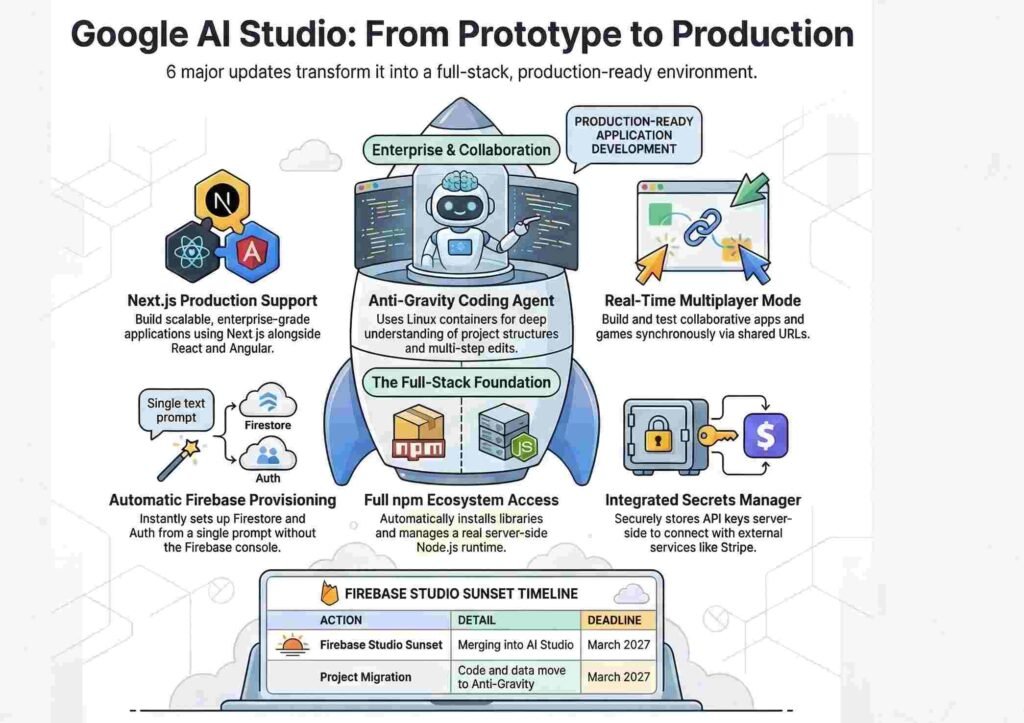
The crown jewel of this release is the deep, automated integration with Firebase. The AI agent can now autonomously detect when your application requires a database or user authentication. By leveraging your Google ID, the agent automatically ties your AI Studio project to the Firebase Console, creating a live backend in real-time.

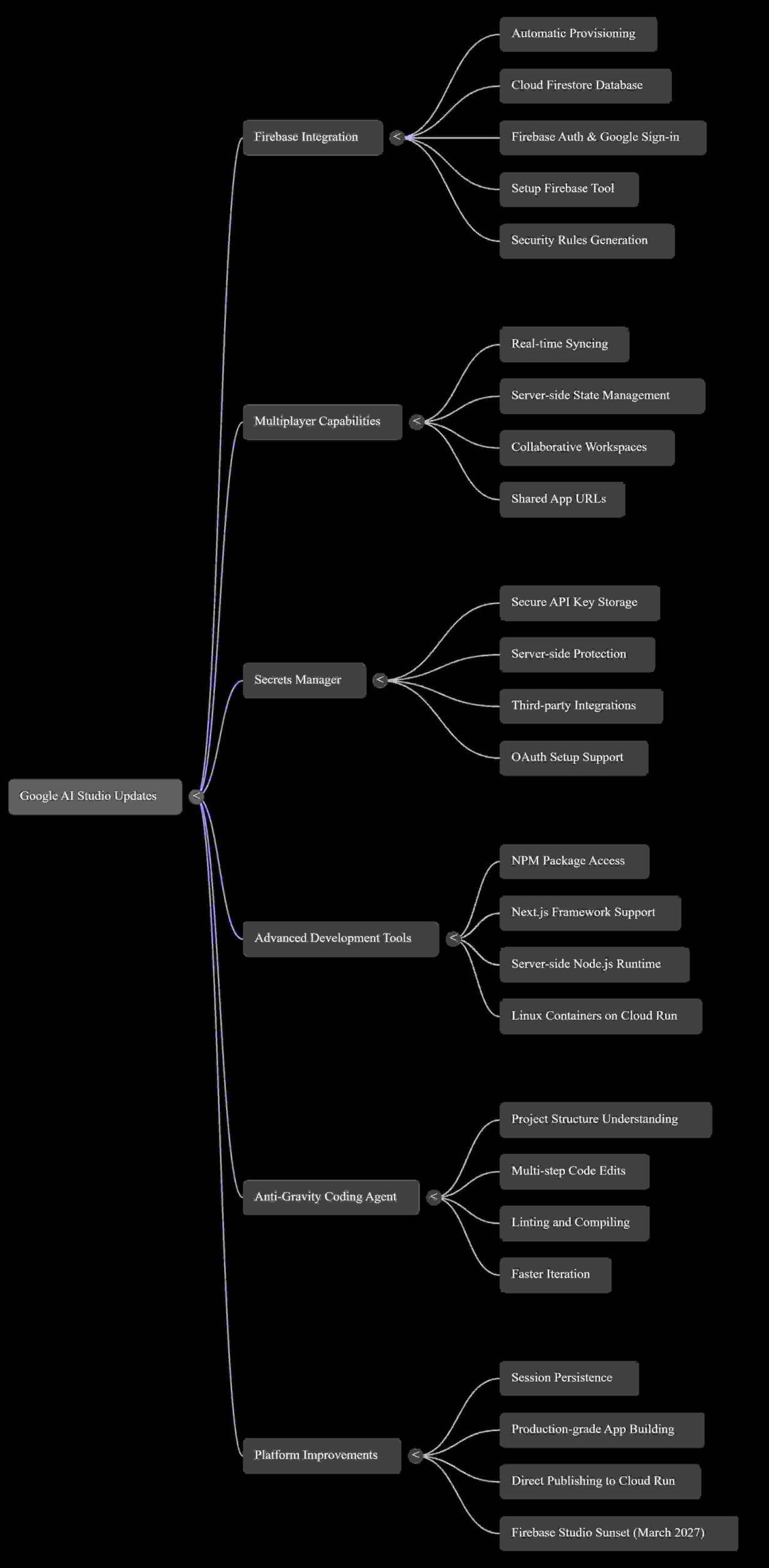
Once granted approval, it uses a dedicated tool called setup firebase to provision Cloud Firestore and Firebase Auth without requiring any manual intervention. The agent handles the entire lifecycle: it creates the project, generates configuration files, writes security rules, and wires up Google Sign-in from a single natural language prompt.
“You are going from prompt to full stack app without ever touching the Firebase console.”
This automatic provisioning is a massive win for speed-to-market. By removing the need to navigate the Firebase console for boilerplate setup, developers can watch their backend infrastructure manifest instantly, allowing them to focus entirely on refining the core logic and user experience.
3. Real-World Connectivity: The New Secrets Manager
To move beyond isolated sandboxes, applications need to interact with external services. Google AI Studio now features a dedicated Secrets Manager within the settings panel. This allows developers to securely store API keys for services like Stripe or Google Maps.
Technical Analysis: Security is paramount in production environments. With this update, API keys are stored server-side and are never exposed in the client-side code. This isn’t just a static storage locker; the agent is proactive. If it detects you are building a feature that requires an external service, it will explicitly guide you through the process, prompting you to add the necessary key to the manager. Furthermore, the integration tab now supports OAuth setups with callback URLs, allowing for secure connections to third-party applications. This transition allows AI Studio apps to function as genuine commercial tools rather than simple demos.
4. Real-Time by Default: Built-in Multiplayer Support
Building collaborative software has traditionally been a nightmare of manual websocket management and state synchronization. AI Studio now supports real-time multiplayer experiences by default. Whether you are building a collaborative workspace, a shared tool, or a multiplayer game, the server-side runtime manages all state and user connections automatically.
To streamline development, Google has included a “Test Mode.” Developers can open multiple browser tabs to simulate different users or share a live URL with others to test real-time syncing in a multi-user environment immediately. Because the state management is handled by the server-side runtime, synchronization across different users and devices is handled effortlessly.
5. Professional Tooling: Next.js and the Full npm Ecosystem
Google has significantly leveled up the tech stack available within the platform. Developers are no longer limited to React and Angular; Next.js is now a first-class framework option.
Analysis: The inclusion of Next.js is a clear signal of Google’s commitment to production-grade applications, representing a shift toward Server-Side Rendering (SSR) capabilities. This is powered by a new server-side Node.js runtime, meaning these apps are no longer mere client-side prototypes—they possess a functional backend. Complementing this is the agent’s new ability to manage the npm ecosystem autonomously. If you ask for smooth animations or professional icons, the agent identifies, installs, and configures libraries like Framer Motion or specific icon sets without the user ever running a manual npm install command.
6. The “Anti-Gravity” Brain: Coding in a Real Linux Environment
The most sophisticated update is the “Anti-Gravity” coding agent, which powers the entire build mode. This isn’t just an LLM outputting text; it is an agent operating within a live Linux container on Cloud Run. It possesses a deep understanding of the project structure and chat history, allowing for precise, multi-step code edits. All of this configuration is tracked in a new applet.json file, which stores your Project ID, API keys, and Firestore database ID, ensuring the environment remains consistent.
The agent utilizes a professional toolset to manipulate the environment directly:
view file/edit file: For direct manipulation of the codebase.lint applet: To ensure code quality and catch errors.compile applet: To build the application in real-time.
By building and testing code in a functional Linux environment, the agent ensures that it is actually constructing the app, not just generating snippets. This is the difference between a code assistant and a deployment engine.
7. Persistence and the Sunset of Firebase Studio
To support long-term development cycles, AI Studio now features “Session Persistence.” This ensures that your code, data, and environment state are saved across sessions. You can close your browser and return on an entirely different device to find your project exactly where you left it.
Strategically, Google is consolidating its ecosystem. Firebase Studio is being sunset, with all features and projects moving to the AI Studio and Anti-Gravity ecosystem. Developers have until the March 2027 deadline to complete this transition, marking AI Studio as the definitive home for AI-assisted development at Google.
8. Conclusion: A New Standard for AI Development
Google AI Studio has evolved from a playground for experimentation into a production-ready engine capable of deploying full-stack applications to Google Cloud Run with a single click. By automating infrastructure, security, and package management, it removes the traditional barriers between an idea and a live product.
As we look forward, we must ask: how will “auto-infrastructure” tools like these redefine the role of the developer over the next two years? We are moving toward a future where the bottleneck is no longer technical configuration, but the bounds of our own creativity. The scale of these updates is, quite frankly, INSANE.
Discover more from TechResider Submit AI Tool
Subscribe to get the latest posts sent to your email.