1. The “AI Fatigue” Problem
We’ve all felt it—that nagging “AI fatigue.” For years, we’ve been stuck in the Chatbot Era, toggling between tabs, copy-pasting text into generic boxes, and receiving answers that feel mathematically correct but contextually hollow. If you’re tired of tools that just talk and want a system that actually understands and executes, welcome to 2026. With the release of Claude 4.6, we’ve officially moved past the novelty of ChatGPT. Claude isn’t just another tab in your browser; it is a full-scale productivity operating system designed to bridge the gap between intent and action.

2. The “Co-work” Revolution: From Chatbot to Desktop Assistant
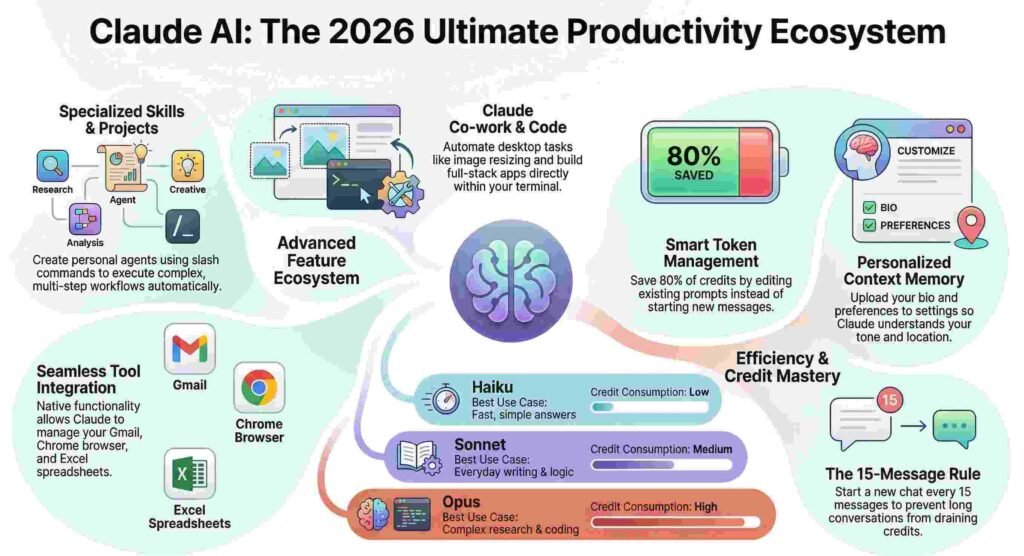
We are witnessing the birth of the “Agentic Era.” Claude’s Co-work capability is the feature that finally allowed me to stop treating AI like a search engine and start treating it like a Chief of Staff. By granting Claude access to your local files and desktop environment, it transforms from a passive advisor into a proactive agent.
Imagine this: You’re out with friends and remember a task. You use the Dispatch feature on your phone to send a quick voice command. Back at home, Claude wakes up your desktop, opens your “Downloads” folder, organizes your messy files into categorized directories, and runs your “Daily AI News Roundup” at 10:00 AM sharp—scanning X (formerly Twitter) for top-performing tech news, drafting scripts, and saving them directly to your desktop.
One of my favorite “in the trenches” workflows is the image processor: I point Claude to a folder of raw assets and say, “Resize these to 1080×1080, overlay my ‘sign.png’ watermark in the bottom right, and convert them to PNG.” It doesn’t tell me how to do it; it just does it.
“It gives Claude access to your desktop to your computer and it can just do tasks on your behalf.”
3. “Skills” and Personal Agents: The Power of the Forward Slash
The forward slash (/) is the new command line for the modern professional. Through Skills, we are replacing “Prompt Engineering” with “Skill Engineering.” A skill is a pre-defined, complex workflow triggered by a single keyword.
For the architecturally minded, a Skill isn’t just a prompt; it’s a package. It consists of a skill.md (a Markdown file containing high-level logic and triggers) and often a backend script, like a Python file (generate_image.py). For example, my /generate_infographic skill doesn’t just write text; it autonomously pings the NanoBanana Pro API via a Gemini API key to render high-quality visual assets in seconds. Whether it’s a /humanizer skill to strip away “AI slop” or a /legal_brief agent, these are personal agents tailored to your specific tech stack.
4. “Teaching” Claude: The Chrome Extension that Learns by Watching
The most profound shift in Claude 4.6 is the move from prompting to demonstrating. The “Teach Claude” Chrome extension allows the AI to learn by observation.
Instead of writing a five-paragraph prompt explaining how to navigate your company’s specific CRM, you simply record yourself performing the workflow. Claude watches the screenshots, listens to your audio explanation, and analyzes the DOM elements. If your routine involves finding an agreement in Gmail, downloading the PDF, uploading it to a specific Google Drive folder, and generating a “view only” link for a client, you only have to do it once. Claude generates a shortcut and can thereafter repeat that multi-site execution on command or on a set schedule.
5. Claude Code: Building Apps from the Terminal
For developers, “Claude Code” has redefined the “micro-build” cycle. Operating directly within the terminal or VS Code, it allows you to iterate at a speed that feels like cheating.
I’ve seen this personally: Claude can generate a fully playable, browser-based Snake game in under two minutes. But the real power lies in complex builds. Using Next.js and React, I prompted a full-scale Expense Tracker with interactive charts, analytics, and local storage. By using the “Plan Mode” (Shift + Tab), I reviewed the implementation phases before a single line of code was written. By utilizing the “Ask User Question” tool, Claude ensured the technical notes matched my requirements for a “clean and minimal” UI. The result? A production-ready local server running a custom app in just 20 minutes.
6. The “Golden Rules” of Credit Conservation
Even in 2026, compute is a currency. To save roughly 80% of your Claude credits and stay within the 5-hour reset windows, follow these “trenches-tested” strategies:
- The 20-Message Rule: Every new message sends the entire chat history back to the model. Summarize the context, copy it, and start a fresh chat every 15–20 messages to keep token costs low.
- Edit, Don’t Reply: If Claude misses the mark, hit the “Edit” button on your original prompt rather than sending a correction. This prevents the “token snowball” effect.
- Batch Processing: Combine five small questions into one comprehensive prompt.
- The Project Vault: Use Claude Projects to upload persistent files (style guides, codebases, or PDFs). This allows Claude to reference the data once without re-uploading (and re-paying) for those tokens every session.
- Global Memory: Set your age, location, and “Strict Vegetarian” or “Goldman Sachs” style preferences in the Memory settings so Claude never has to ask twice.
- Model Tiering: Use Haiku for quick Slack replies, Sonnet for general work, and reserve the credit-heavy Opus for deep research and heavy-lift coding.
- Zone Budgeting: Divide your high-intensity tasks into morning, noon, and night sessions to align with the 5-hour credit resets.
- Trim the Fat: Disable Web Search, Research, or Extended Thinking if the task is a simple formatting job.
7. Seamless Migration: Bringing Your “ChatGPT Brain” to Claude
Leaving ChatGPT doesn’t mean losing years of personalization. You can migrate your “AI Brain” in minutes.
Start in ChatGPT with a specific command: “Extract everything you know about me—my writing style, my professional background, my preferences, and my past projects—into a comprehensive summary.” ChatGPT will output a dense “personality file.” Copy that text and paste it directly into Claude’s Memory or a Project Instruction box. This ensures Claude understands your tonality and “Goldman Sachs analyst” persona from the very first interaction.
8. Conclusion: The Future is Contextual
Claude is no longer just a chatbot; it’s a specialist. In Finance, it acts as a Senior Equity Analyst at Goldman Sachs, screening stocks for a 50 lakh INR portfolio across Energy and IT sectors with bull and bear case targets. In Education, the Artifacts feature turns “tell me about photosynthesis” into a live, interactive animation where you can click through the chemical equations in real-time.
The tools have arrived. The infrastructure is ready. The only remaining question is: are you still treating AI as a glorified search engine, or are you ready to let Claude become the operating system for your professional life?
Discover more from TechResider Submit AI Tool
Subscribe to get the latest posts sent to your email.