
1. The Silent Rebellion Against the “Most Secure” Windows
For years, Microsoft has championed Windows 11 as its most secure and productive operating system to date. Yet, a quiet rebellion is brewing in IT departments and home offices alike. Instead of the rapid adoption Microsoft anticipated, we are witnessing a “Silent Exodus.” Millions of users are effectively barricading themselves within Windows 10, viewing the newer OS not as an upgrade, but as a strategic downgrade in both usability and performance.
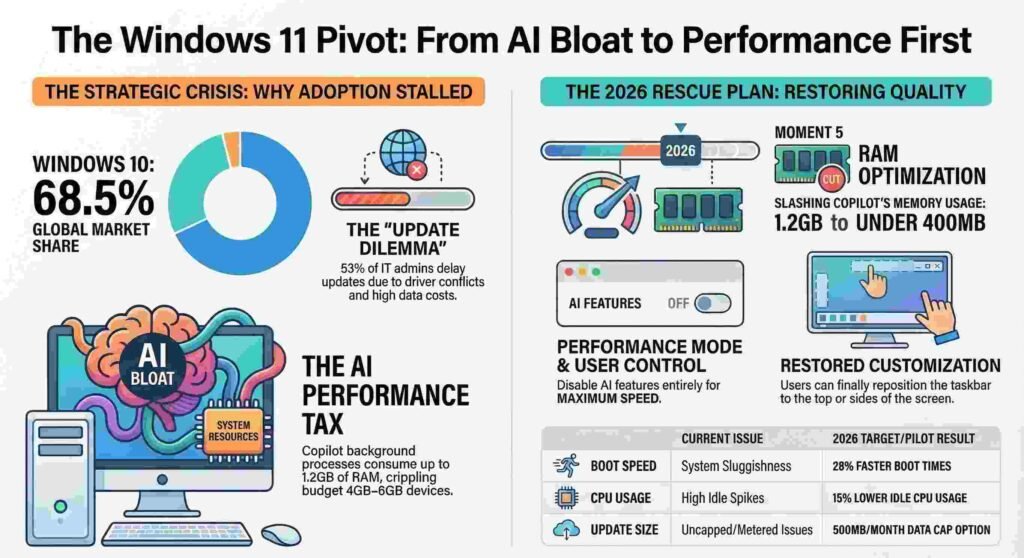
The stakes for Redmond are exceptionally high. Recent market share data reveals that Windows 11 has failed to gain a meaningful foothold, particularly in price-sensitive regions where hardware constraints are a reality. By Q1 2024, the aging Windows 10 continued to dominate the landscape, forcing Microsoft into a “strategic crisis.” This has triggered a pivot in the 2026 roadmap, shifting focus away from flashy AI gimmicks and toward fundamental “performance-first” engineering.
Windows Market Share (Q1 2024)
| Market | Windows 11 | Windows 10 | Others (Linux/macOS) |
| Global | 26.4% | 68.5% | 5.1% |
| India | 18.9% | 72.3% | 8.8% |
2. The Pivot from AI-Obsession to “Performance-First” Engineering
Microsoft is finally confronting the “AI Paradox.” While the company spent 2023 and 2024 aggressively “AI-washing” every corner of the OS with Copilot, the move backfired spectacularly on budget hardware. In India, a telling study by Counterpoint Research found that 42% of PC users disabled Copilot within weeks, citing system slowdowns and unwanted data collection. On devices with 4GB to 8GB of RAM, Copilot’s resource hunger wasn’t just an annoyance—it was a dealbreaker.
To rectify this, the upcoming “Moment 5” initiative represents a significant technical retreat. The goal is to optimize the interface rather than bloat it. Key technical targets include:
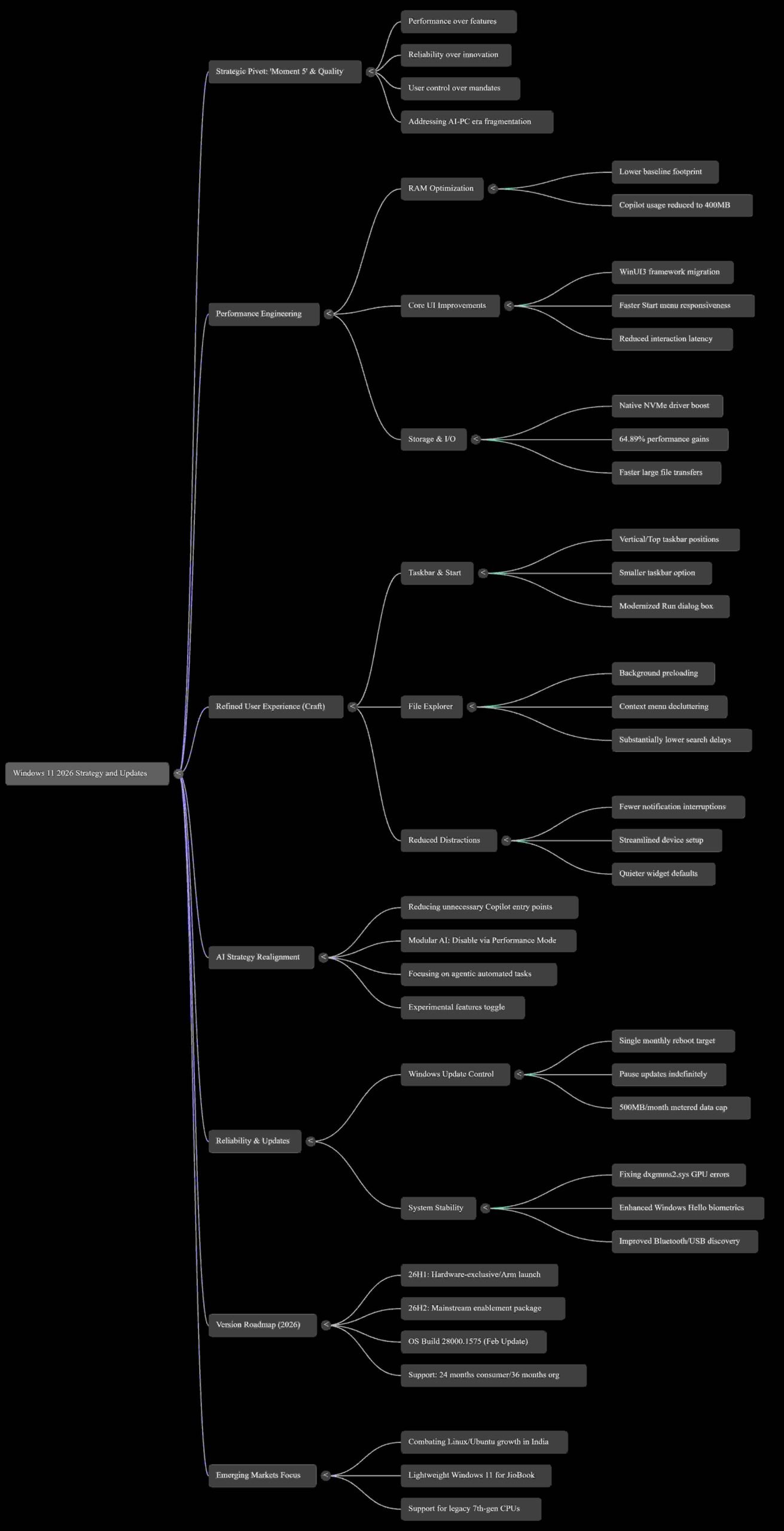
- Drastic RAM Optimization: Reducing Copilot’s background memory usage from a bloated 1.2GB to under 400MB.
- Faster Boot Times: Achieving up to 28% faster boot times on 8GB laptops.
- A “Kill Switch” for AI: A new “Performance Mode” toggle—located in Settings > System > AI components—that allows users to disable AI features entirely to reclaim system resources.
“You will see us be more intentional about how and where Copilot integrates across Windows, focusing on experiences that are genuinely useful and well‑crafted. As part of this, we are reducing unnecessary Copilot entry points, starting with apps like Snipping Tool, Photos, Widgets and Notepad.” — Pavan Davuluri, Microsoft President for Windows and Devices
3. Admitting UI Failure: The Return of the Flexible Taskbar
The transition to Windows 11 introduced a “Customization Conundrum.” By forcing a centered taskbar and removing long-standing power-user features, Microsoft adopted a “one size fits none” philosophy. This rigidity has been a gift to Linux. Adoption has surged 212% in the Indian education sector as users flee to Zorin OS and Ubuntu. Nowhere was this more evident than in the Kerala State IT Mission, which migrated a staggering 2.5 million school computers to Ubuntu, citing ₹150 crore ($18 million) in licensing savings and far superior performance on legacy hardware.
In a major reversal, Microsoft’s 2026 UI overhaul will finally return control to the user. The upcoming changes include:
- Repositionable Taskbar: The ability to move the taskbar to the top or sides of the screen is officially returning.
- WinUI3 Framework Migration: A total rewrite of the Start menu and File Explorer using the WinUI3 framework. This move is designed to eliminate the “Cthulhu-madness” of clashing legacy frameworks (UWP, Win32, and web-wrappers) that currently cause interaction latency.
- Context Menu Declutter: Common actions like “Compress to ZIP file” and “Copy as Path” are being grouped into a new “Manage file” submenu to reduce visual noise.
4. The “Lightweight Windows” Strategy: Lessons from Emerging Markets
The push for a leaner OS was spurred by high-profile failures in emerging markets. In Tamil Nadu, rural school rollouts of 50,000 laptops faced immediate backlash when Copilot’s background processes consumed nearly a third of the available RAM on 4GB devices, causing systems to freeze during exams.
In response, Microsoft is adopting a “Trust Transparency” framework. New update policies include:
- Data Usage Caps: Capping update downloads at 500MB/month for users on metered connections.
- Update Deferral: Allowing a 90-day deferral for non-critical security patches.
- 30-Day Rollback Guarantee: An extended window to revert to a previous version if an update compromises stability.
Most interestingly, Microsoft has partnered with Reliance Jio to test a “Lightweight Windows 11” variant on JioBook laptops. This version swaps Cortana for Jio’s AI assistant (HiJio) and utilizes system file compression to save 3GB of storage space.
“Our students don’t need AI to write essays—they need stable devices that don’t freeze during exams.” — District Education Officer, Madurai
5. Under the Hood: Rebuilding the Bedrock of Reliability
Beyond the interface, Microsoft is addressing the “bedrock of reliability” to combat competitive pressure. Apple’s MacBook Neo—the company’s most affordable MacBook to date—is currently squeezing Windows from the middle-market, while Linux distros that run on 2GB of RAM are winning the bottom-market. Windows 11 was caught in a precarious “dead zone.”
The 2026 updates (starting with the Arm-only 26H1 and the broader 26H2 release) focus on:
- Deep Technical Fixes: Critical patches for the
dxgmms2.sysgraphics error (KERNEL_SECURITY_CHECK_FAILURE) and WPA3 Wi-Fi connection issues. - Trimming Legacy Bloat: The removal of .NET Framework 3.5 as a “Feature on Demand,” requiring a standalone installer to reduce the OS’s initial footprint.
- Modernizing the Legacy: A modern redesign of the Run dialog box using Fluent Design principles, and a move to open-source WinUI3 to encourage third-party performance consistency.
- Gaming Efficiency: A new Xbox Full Screen Mode for PCs that replaces the traditional desktop interface with a controller-friendly dashboard, freeing up RAM typically consumed by background desktop processes.
6. Conclusion: A New Era of User Control?
Microsoft’s 2026 strategy marks a fundamental shift in corporate philosophy. After years of prioritizing “Innovation without Infrastructure,” the company has realized that speed and stability are non-negotiable foundations. By focusing on “Craft” and “Reliability,” Microsoft is attempting to win back a disillusioned user base that has grown weary of forced features and bloated updates.
The question remains: is this pivot enough? While these changes address the most glaring pain points of Windows 11, the “Windows 10 forever” crowd is notoriously difficult to move. As Apple squeezes the middle-market with the MacBook Neo and Linux dominates the budget education sector, has Microsoft’s mea culpa arrived in time to save its window of opportunity?
Discover more from TechResider Submit AI Tool
Subscribe to get the latest posts sent to your email.
