We have reached a point of “update fatigue.” For years, the annual rhythm of operating system reveals has felt incremental—a slightly different font here, a minor privacy toggle there. Most users have grown accustomed to their phones being reactive tools: they sit in our pockets, waiting for us to tell them what to do.
Android 17, rolling out today to Pixel devices, marks a departure from that passive relationship. It represents a fundamental shift from a “smart” OS to a “proactive” one. It is an update that acknowledges the smartphone is no longer just a communication device; it is a production studio, a high-end gaming console, and a digital vault.
Beyond the aesthetics, Google is attempting to solve the friction of modern digital life. By embedding intelligence into the core architecture of the OS, Android 17 moves beyond the traditional app-launcher model to create a persistent, fluid environment that anticipates your next move.
Beyond App-Switching: The “Bubble Bar” and Persistent Flow
For over a decade, mobile multitasking has been defined by the “app switcher”—a jarring interruption where one task must be pushed aside to view another. Android 17 seeks to end this fragmentation with the introduction of “Bubbles” and the “Bubble Bar.”
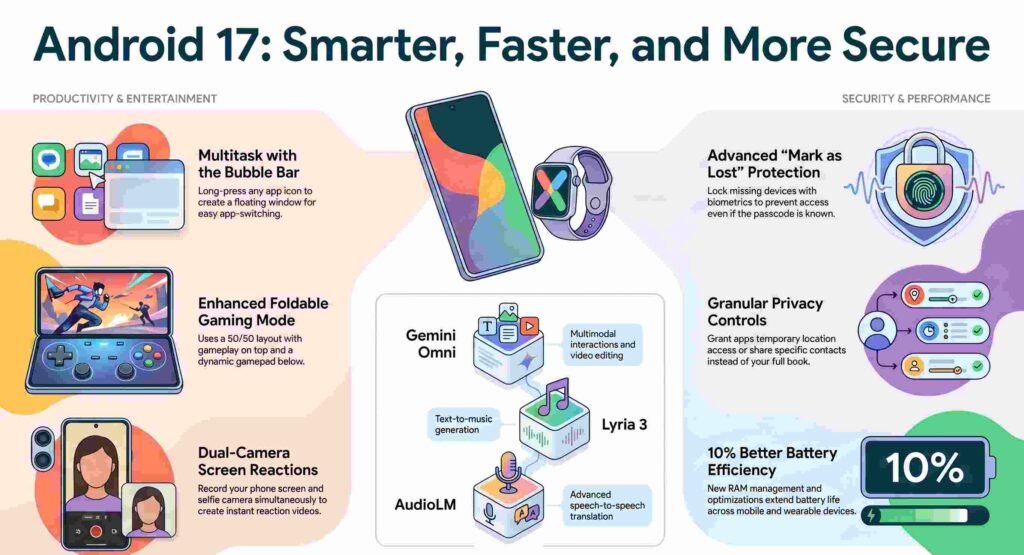
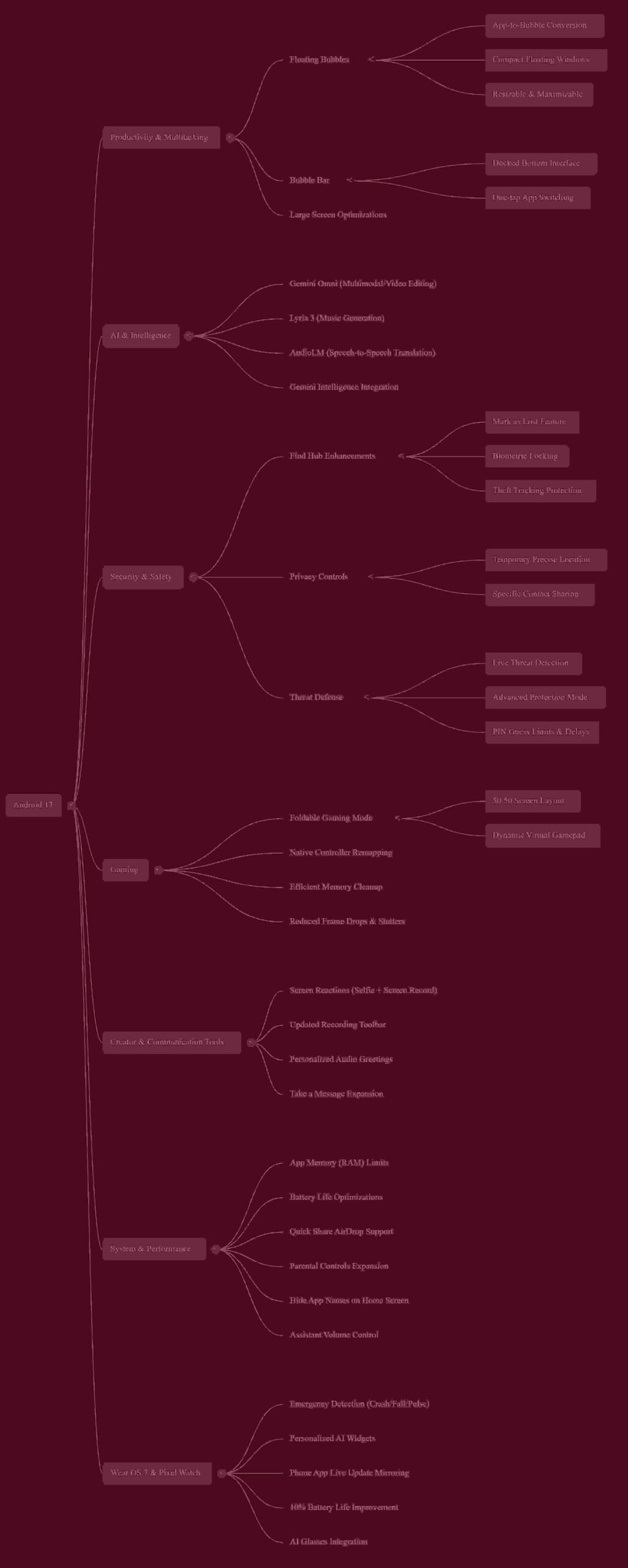
Users can now long-press any app icon to transform it into a compact, floating window that sits on top of their current activity. On larger screens and foldables, these windows dock into a dedicated “Bubble Bar” at the bottom of the interface, allowing for a desktop-like environment where you can reference a map, check a sports score, or monitor a tutorial without ever leaving your primary workspace. This is a significant UX shift, moving away from full-screen toggling toward a persistent multitasking flow.
“Bubbles allows you to turn any app into a compact, floating window so you can stay in the flow.” — Seang Chau, VP and GM of Android Platform
The Creator’s Secret Weapon: Seamless Screen Reactions
Content creation is no longer a niche hobby; it is a primary way we communicate. Previously, creating “reaction” videos or tutorials required a complex stack of third-party apps, green screens, and post-production editing.
Android 17’s new “Screen Reactions” feature turns the OS into a streamlined production studio. With a few taps on the updated screen recording toolbar, users can record their selfie camera and their phone screen simultaneously. By allowing users to overlay their thoughts directly over apps, sites, or trending videos in real-time, Google has effectively lowered the barrier to entry for creators on platforms like TikTok and YouTube.
The End of the “Passcode Thief”: Biometric “Mark as Lost”
As physical phone thefts and “shoulder surfing”—where thieves watch users enter passcodes before stealing the device—have risen, the traditional passcode has become a single point of failure. Android 17 addresses this with a counter-intuitive but brilliant security update in the Find Hub.
The enhanced “Mark as Lost” feature introduces a biometric requirement that overrides the passcode. Even if a thief has successfully obtained your PIN or pattern, they are barred from accessing sensitive information or, more importantly, disabling the device’s tracking. By requiring biometrics to stop tracking once a device is flagged, Google renders a stolen passcode useless.
Furthermore, the OS introduces more granular, proactive privacy wins: users can now grant apps temporary access to their precise location or choose to share only specific contacts rather than their entire address book.
Software as Hardware: The Foldable Gaming Revolution
For years, foldable phones have felt like hardware searching for the right software. Android 17 finally provides a justification for the premium price point of these devices with its new “Foldable Gaming Mode.”
The update introduces an optimized 50/50 layout that transforms the device into a dedicated gaming handheld. The top half of the screen serves as the primary game view, while the bottom half becomes a dynamic, customizable gamepad. Combined with “under the hood” memory cleanup that reduces frame drops and native controller remapping, the OS is now doing the heavy lifting to turn foldable hardware into a legitimate gaming console.
The AI Utility: Gemini moves from Chatbot to OS Engine
AI on Android is no longer just a “side-chat” or a standalone destination; it is becoming the invisible engine that powers creative and communicative workflows. In the latest Pixel Drop, Google is embedding advanced models directly into the apps you already use:
- Lyria 3: Integrated into the Gemini app, allowing users to generate music tracks via text prompts or images.
- Gemini Omni: Enables multimodal video editing through simple conversation within Pixel’s recording and editing tools.
- AudioLM: Powers advanced speech-to-speech translation tools, specifically for the Pixel 10a.
This shift suggests that AI is moving into a “proactive” role, where the system understands the context of your files and history to assist in real-time.
“Select advanced devices will get Gemini Intelligence… helping you stay a step ahead and work proactively to get things done throughout your day.” — Google Platform Update
The “Surprise” Bridge: Quick Share Meets AirDrop
In a surprising move that challenges the traditional “walled garden” philosophy, Google has introduced a major win for user convenience. Android Quick Share is now becoming compatible with Apple’s AirDrop on specific models, including older Pixel 8a and 9a devices. This cross-platform bridge removes one of the primary friction points between Android and iOS users, allowing for seamless file sharing regardless of the ecosystem.
Conclusion: The Dawn of the Proactive OS
While the flashy features like 50/50 gaming and music generation will grab the headlines, the true foundation of Android 17 lies in its performance optimizations. Between the up to 10% battery life improvement on Wear OS 7 and new system-level RAM limits, the OS is being rebuilt for efficiency. These RAM limits aren’t just technical stats; they serve a human-centric purpose by preventing background apps from over-consuming resources and “killing” the app you are currently using, ensuring your digital flow remains uninterrupted.
This leads to a larger question for the modern user: As our phones transition from tools we command to proactive partners that anticipate our needs—whether that’s locking down our data via biometrics or helping us edit video through conversation—are we ready for a device that works ahead of us? Android 17 suggests that the era of the passive smartphone is officially over.
Discover more from TechResider Submit AI Tool
Subscribe to get the latest posts sent to your email.