The “Instant Speed” Illusion
For digital leaders, web developers, and agency owners, the sales pitch is strikingly consistent: a vendor or agency presents a sleek, instant-loading demo site running on a modern headless CMS, prompting an immediate decision to abandon traditional monolithic platforms like WordPress.

However, moving off a traditional CMS to a decoupled headless architecture is rarely an automatic quick-fix for performance or organic search rankings. In reality, it represents a fundamental system-design trade-off. While sales demonstrations highlight pristine front-end speed and technical flexibility, they routinely obscure the substantial operational and engineering responsibilities that shift behind the scenes.
This analysis uncovers the top five surprising realities of transitioning to a headless CMS architecture—distilling what actually changes, what frequently breaks in production, and how to evaluate whether a decoupled stack truly serves your organization’s technical capacity and commercial goals.
1: Headless CMS Doesn’t Fix Your SEO—It Just Transfers Plugin Features to Your Dev Backlog
Decoupling your content repository from your presentation layer creates substantial, often unexpected engineering responsibilities.
In traditional monolithic setups, all-in-one plugins automatically handle essential technical SEO mechanics. Canonical tags, XML sitemaps, 301 redirect mapping, schema controls, hreflang tags, and draft previews are managed out-of-the-box or via simple backend extensions.
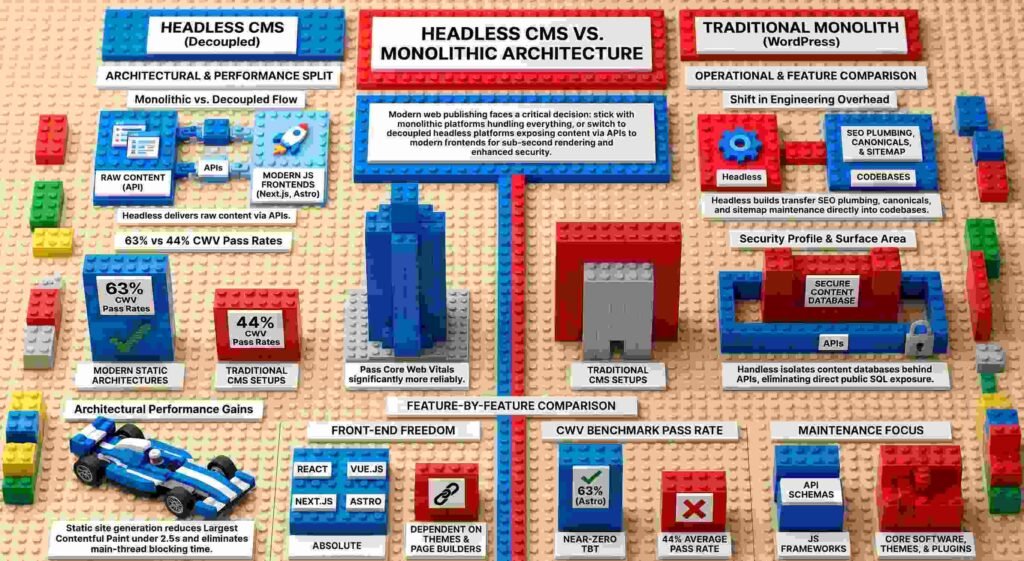
In a headless architecture, none of these features exist by default. The underlying CMS acts strictly as a raw database exposed via API. Consequently, every technical SEO requirement must be manually designed, implemented, tested, and maintained by your software engineering team. Leaving these technical tasks unassigned during a migration regularly results in catastrophic organic visibility losses post-launch.
The failure modes in real-world migrations are both predictable and severe:
- Staging and Draft Indexation Leaks: Preview environments and draft URLs accidentally leak into search engine indexes when custom front-end applications lack strict header-level preview protection or
noindexdirectives. - Silent Hreflang Breakage: Multi-language setups frequently break because locale mapping and dynamic URL routing across decoupled endpoints are not explicitly handled in custom frontend components.
- Flawed Redirect Mapping: Engineering teams often construct 301 redirect maps solely from current XML sitemaps rather than auditing legacy page URLs that actually earned high-value external backlinks, effectively severing domain authority overnight.
Gains in search performance stem entirely from modern front-end delivery choices (such as Next.js, Static Site Generation [SSG], or Server-Side Rendering [SSR]) rather than the headless database itself.
“A rebuild on a headless stack fixes that by accident, and charges you for the accident by moving a dozen SEO and editorial responsibilities out of a plugin and into your own engineering backlog.” — Amir Mousavi, Web Architect
2: The 56% Core Web Vitals Failure Rate (Monolith Bloat vs. Static Reality)
Empirical data reveals a severe performance divide between traditional monolithic platforms and modern decoupled front-ends utilizing Static Site Generation (SSG) or Server-Side Rendering (SSR).
Data from the HTTP Archive and Chrome UX Report shows that 56% of WordPress sites fail basic Core Web Vitals benchmarks, leaving only 44% in the passing range. Conversely, modern SSG frameworks like Astro achieve a 63% pass rate.
Traditional monolithic platforms struggle with performance due to structural bottlenecks:
- Server-side PHP dynamic rendering executed on every request.
- Repetitive database queries.
- Unused CSS and JavaScript bundles pushed across entire themes.
- Heavy theme overhead and accumulated third-party plugin bloat.
When migrating from a bloated monolithic setup to an SSG framework (such as Astro or Next.js), the performance impact of architectural separation becomes measurable across every critical metric:
| Metric | Traditional Monolithic Setup (WordPress) | Decoupled / SSG Setup (Astro / Next.js) |
| Largest Contentful Paint (LCP) | 0.81s | 0.44s (46% faster) |
| SEO Audit Score | 86 | 100 (Perfect Score) |
| HTML Document Size | 38.9 KB | 10.9 KB (72% smaller) |
| JavaScript Payload | 13.4 KB | 5.3 KB (60% reduction) |
| CSS Payload | 67.2 KB | 6.6 KB (90% reduction) |
3: The “Plugin Trap”—97% of Traditional CMS Vulnerabilities Stem from Extensions
The cybersecurity threat model of a decoupled headless system offers a fundamentally superior security profile compared to extension-heavy monolithic platforms.
Security research reveals that 97% of security vulnerabilities in traditional WordPress environments originate from third-party plugins rather than core platform code. Relying on a sprawling chain of extensions continuously expands the public attack surface.
A decoupled headless architecture drastically reduces cybersecurity risk by removing public access to the CMS core:
- Hidden Public Surfaces: The underlying content repository and administration interface are hosted separately and completely isolated behind secure API gateways.
- Attack Vector Elimination: Direct SQL injection vectors, public endpoint exploits, and theme-level vulnerability paths are removed entirely from the public-facing application.
- Enterprise Access Governance: Security teams can enforce strict governance natively through Role-Based Access Control (RBAC) and enterprise Single Sign-On (SSO) protocols, including OAuth, Keycloak, or Active Directory.
4: Open-Source Is Winning the Headless War Against Enterprise SaaS Giants
The market shift away from proprietary enterprise SaaS headless providers (such as Contentful and Sanity) toward self-hosted, open-source engines like Strapi and Payload CMS is accelerating.
Mid-market organizations are increasingly stepping back from enterprise SaaS choices due to severe operational friction:
- Unpredictable per-seat licensing and tier-based pricing escalation.
- Restrictive usage tiers and API rate limits at scale.
- Vendor lock-in and zero underlying code access.
Open-source alternatives are capturing market share by addressing these pain points directly:
- Full Code Ownership: Released under open licenses (MIT) with zero host-side vendor constraints or arbitrary rate limits.
- TypeScript Ecosystem Integration: Native TypeScript support throughout, matching modern front-end tooling stacks.
- Predictable Costing: Infrastructure costs scale linearly with cloud hosting resources rather than expanding editor license seats.
The AI & RAG Pipeline Advantage
The critical technical differentiator centers on AI and Retrieval-Augmented Generation (RAG) integration. Open-source Node.js/TypeScript engines allow developers to hook directly into backend database lifecycle events (afterCreate, afterUpdate).
Upon content save or publish events, custom backend middleware automatically extracts, transforms, and streams structured content into AI embedding pipelines (via LangChain or direct LLM APIs like OpenAI or DeepSeek). These embeddings are indexed directly into vector databases (such as Qdrant or Pinecone) to power real-time AI search agents and chatbots. Closed, proprietary SaaS platforms force organizations to work within rigid, walled-garden AI tools that lack the architectural flexibility required for production-grade RAG systems.
5: The Hard Truth—Headless Architecture Is Overkill for Most Simple Websites
Despite its front-end performance and security isolation, adopting a pure headless architecture introduces significant complexity and cost that is unnecessary for standard digital properties.
Building and maintaining a fully decoupled stack introduces distinct long-term friction:
- Infrastructure Overhead: Engineering teams must maintain dual codebases (the CMS backend and the front-end JavaScript application), manage continuous deployment pipelines, and fund ongoing DevOps oversight, driving up the Total Cost of Ownership (TCO).
- Reduced Editorial Velocity: Marketing teams lose out-of-the-box, drag-and-drop visual page builders (like Elementor) and real-time page previews. Unless developers invest heavily in building custom visual editing and preview components, content creators are restricted to form-based data entry.
The “Decoupled / Hybrid” Middle Ground
For teams seeking front-end performance without sacrificing editorial velocity, Decoupled or Hybrid WordPress offers an effective architectural compromise. By utilizing WordPress purely as a headless content engine (exposing content via the native WP REST API or WPGraphQL) coupled with a modern Next.js or Astro front-end, content creators retain their familiar Gutenberg or Elementor publishing dashboard while developers deliver a fast, edge-cached static site.
“The debate isn’t about which system is inherently better, but about where you want to spend your engineering budget. Headless gives you unmatched front-end performance and design control, but WordPress wins on editorial velocity and content-team autonomy every single day.” — Itamar Haim, Web Development Specialist
Conclusion: Evaluating Your Architectural Roadmap
Decoupling your content layer is fundamentally a system-design decision, not an off-the-shelf speed upgrade.
Choose a headless CMS architecture when your product roadmap demands multi-channel content distribution (web, mobile apps, IoT), complex backend API logic, deep security isolation, and dedicated front-end performance engineering. Maintain a traditional or hybrid monolithic approach when your priorities center on visual publishing speed, marketing team autonomy, minimal DevOps overhead, and total cost efficiency.
Operational Readiness Framework
Before committing to a headless CMS migration, evaluate your technical roadmap against this four-step readiness assessment:
- Engineering Capacity & Budget Audit:
- Do you have dedicated in-house or retained React/Next.js/Node.js software engineers to build, test, and maintain custom API connections, deployment pipelines, and technical SEO features long-term?
- Distribution & Visual Editing Mapping:
- Is your content consumed across multiple independent platforms (web app, mobile app, digital signage), or does your marketing team depend on drag-and-drop visual layout builders and instant on-page previews to maintain publishing momentum?
- Security & Governance Standards:
- Does your organization operate in a highly regulated industry requiring complete isolation of the backend database, air-gapped infrastructure, or mandatory SSO/RBAC enterprise controls?
- Migration & Redirect Protocol:
- Do you have an explicit migration blueprint that maps legacy link-earning target URLs to new routes, enforces staging environment indexation protection, and verifies schema structures prior to DNS cutover?
Evaluating these operational factors before buying into vendor sales demos will ensure your architectural choices align with both your technical capability and long-term commercial goals. Is your organization truly structured to build and maintain a custom software application for its web presence, or are you taking on massive engineering overhead for performance gains that could be achieved within your existing stack?
Discover more from TechResider Submit AI Tool
Subscribe to get the latest posts sent to your email.